
Priority Matrix can filter your items so that you can either concentrate on unfinished tasks, review finished items, or look at everything in one place. Here’s how to toggle between these modes for optimal productivity.
Accessing the Filter Options
- Open the Filters Panel: To begin filtering your items by their state, you will first need to access the filter options. Click on the “filters” button, typically found on the toolbar or within a menu. This action will open a sidebar on the right side of your app interface where you will find various filtering options.
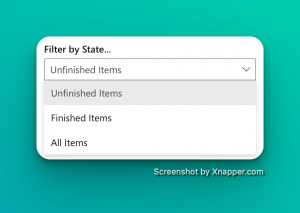
- Locate the ‘Filter by State’ Option: Within the sidebar, look for the section titled “Filter by State” or a similar phrase. It is here that you can select how items will be displayed based on their completion status.
Toggling Between Modes
Viewing Unfinished Items
If you want to focus on the tasks at hand, select ‘Unfinished Items’. Click on the dropdown menu under “Filter by State” and select “Unfinished Items” from the list. This will immediately filter your view to only show items that have not yet been completed.
With the unfinished items displayed, you can now focus on prioritizing and completing these tasks without the distraction of completed items cluttering your view.
Reviewing Finished Items
To reflect on your accomplishments or to verify completed work, choose ‘Finished Items’. Open the same dropdown menu and select “Finished Items.” Your view will change to show only the tasks that have been marked as done.
You can now see all the items you have finished, which can be useful for reporting, invoicing, or simply assessing your productivity.
Viewing All Items
For an overview of all tasks, whether complete or incomplete, select ‘All Items’: Click on the dropdown menu and choose “All Items.” This selection will show you every item, disregarding their state. With all items visible, you can get a holistic view of your project’s progress and plan accordingly.
Tips for Managing Your Workflow
- Regularly Update Item States: Ensure you regularly update the status of each item to keep your filters effective and your project view accurate.
- Customize Your Filters: In Priority Matrix you can create custom filters to save common options including due dates, tags, or other relevant criteria.
Conclusion
Effectively managing your tasks can lead to enhanced productivity and a clearer mind. By using the “Filter by State” feature in Priority Matrix, you can tailor your view to match your current focus, whether that’s homing in on pending tasks, reviewing your achievements, or getting an overall picture of your project’s progress. Remember to make the most out of the available tools to streamline your workflow.